
Introduction
We continue to share details on the malicious techniques and toolsets used by the ToddyCat APT group. In the first part of this report, we examined the group’s attacks aimed at stealing data from browsers, as well as from local and cloud email services. The methods used in that campaign indicated that ToddyCat was attempting to access corporate correspondence while evading monitoring tools. However, all of the group’s methods we described previously are effectively detected by EPP and EDR solutions.
The attackers continued their search for ways to bypass security solutions and developed a new tool to gain access to a victim’s cloud account via the Google API. Armed with this tool, the group automated all stages of the attack and managed to remain undetected by monitoring systems.
In this part of the report, we break down the mechanics of this new attack and analyze the tool that was used to automate it. We’ll also discuss how to detect and defend against this threat.
Umbrij
In this campaign, the attackers focused their attention on corporate email communications hosted on Gmail, targeting access compromise via APIs. Because the Google API relies on the OAuth 2.0 protocol for authorization, applications can use an OAuth token to access requested email resources. To acquire this token, the threat actors developed a tool called Umbrij and used it to connect to the browser’s management console in headless mode via a remote debugging port. Through a series of requests, they obtained an OAuth authorization code, which they subsequently exchanged for an access token to reach the target resources via the API. We have dubbed this technique Shadow Token via Remote Debug (STRD).
This attack is viable on Chromium-based browsers. If the user has not logged out of their Gmail account, the browser maintains an active session. The attackers exploit this: they launch the browser, connect via the remote debugging port to take control, and send a request to the Gmail service to grant access to the Google account resources within the context of the user’s saved session.
During our investigation of this attack, we discovered several versions of the Umbrij tool. These versions included a variety of helper functions designed for debugging, as well as for searching and selecting user accounts within the browser, among other tasks.
Kaspersky solutions detect this tool with the following verdicts: HEUR:Trojan-PSW.MSIL.Umbrij.gen, HEUR:Trojan.MSIL.Agent.gen, HEUR:Trojan-PSW.MSIL.Agent.gen.
Execution
The Umbrij tool was discovered during a proactive threat hunting operation: a scheduled task, KasperskyEndpointSecurityEDRAvp, was running on a user host, launching a digitally signed file. Kaspersky solutions do not create scheduled tasks with that name; the attackers were attempting to masquerade their malicious activity as a legitimate process.
The signed file then used the DLL sideloading technique to load the malicious tool.
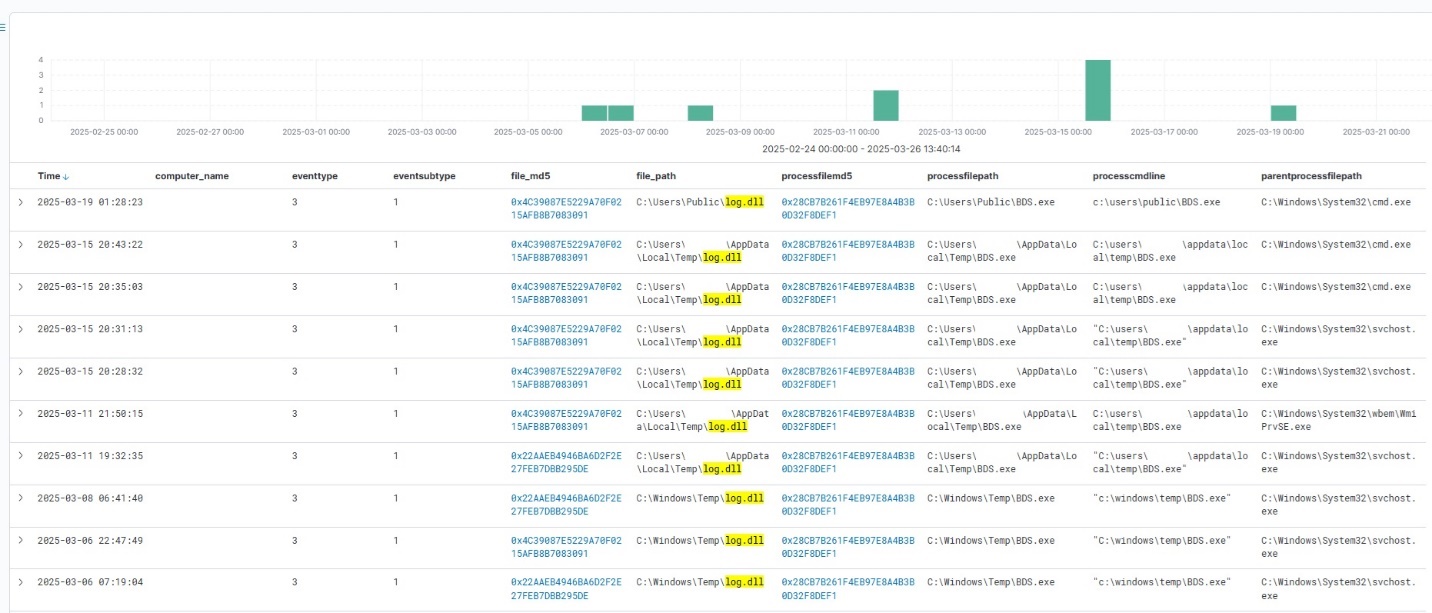
Umbrij execution events within Kaspersky Managed Detection and Response
Throughout our observation period, we identified the following legitimate files vulnerable to the DLL sideloading technique that were used to launch Umbrij:
- BDSubWiz.exe: a component of the Submission Wizard in Bitdefender ConnectAgent, which is used to support connection features and interaction with other Bitdefender services or agents. This file insecurely loads a file named log.dll.
- VSTestVideoRecorder.exe: a component of the video-recording tool used for testing with Visual Studio (VS Test). This executable insecurely loads a file named Microsoft.VisualStudio.QualityTools.VideoRecorderEngine.dll.
- GoogleDesktop.exe: the discontinued Google Desktop Search application for indexing files and performing quick searches on a local Windows computer. This executable insecurely loads a file named GoogleServices.dll.
These files were used to load different versions of Umbrij; the same legitimate file could be leveraged to launch more than one variant. In total, we discovered three versions of Umbrij, which we refer to as a, b, and c for convenience.
The tool itself is a DLL written in .NET and obfuscated with ConfuserEx, an open-source obfuscator for .NET applications.
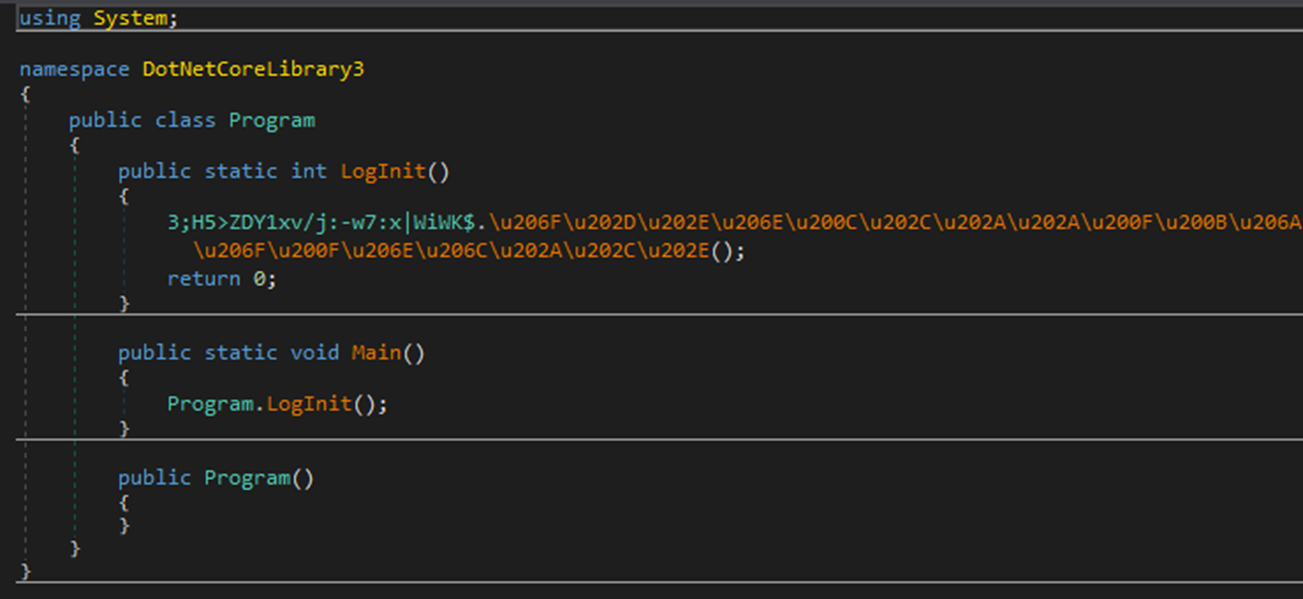
Example of an obfuscated code snippet
Umbrij is managed with the help of parameters passed through a command line at startup, although it is occasionally executed without any parameters. Below are examples of the command lines observed in attacks against users:
"c:UsersPublicBDSubWiz.exe" -regex <name> -deepsearch
c:windowsvssbds.exe
However, these are not the only parameters the tool can accept and process. During the analysis of its executable code, we discovered additional parameters that vary depending on the version of Umbrij. See the table below for the parameters and their descriptions.
| Version | Command | Description |
| a | -regex <string> | Used in conjunction with the -deepsearch parameter. Specifies a substring to search for within the user_name field of the user profile file, which typically contains the email address. The tool will utilize the user profile that matches this specified substring |
| a | -user <username> | Specifies the system username under which the tool will run |
| a | -runas-currentuser | Configures Umbrij to run within the execution context of the current user |
| a | -deepsearch | Enforces additional checks on the user_name field in the user profile: verifying that it is not empty and that it contains the substring specified in the -regex parameter |
| a, b, c | -path <path> | Specifies the full path to the directory containing the browser’s executable file |
| a, b, c | -browser <both|msedge|chrome> | Specifies which browser the tool should target: Google Chrome, Microsoft Edge, or both |
| a, b, c | -debugport <port> | Specifies the remote debugging port number |
| a, b, c | -sync | When this parameter is specified in the URL, the value 1095133494869 replaces 279448736670 in the permission request |
| b | -domainAd | Specifies the domain name if the user account is a domain account |
| b | -savepdf | Instructs Umbrij to save a screenshot of the user profile as a PDF file |
| c | -lport | Same as debugport |
Environment preparation
At startup, the tool evaluates several prerequisites required to carry out the attack and performs preparatory actions to subsequently compromise the Gmail account.
First, Umbrij verifies the availability of the port that will be designated for browser debugging. To accomplish this, the tool utilizes a function named ChekPortAvailable() (original spelling retained), which accepts the target port number as a parameter. It then retrieves information about active connections on the host using the .NET GetActiveTcpConnections() function from the System.Net.NetworkInformation namespace. The tool iterates through each connection in a loop, comparing the port number to the one it is checking.

The ChekPortAvailable function used to verify open ports
After this, the tool retrieves the user context. It searches the system for the explorer.exe process and duplicates its token, retaining all of its privileges (T1134.003 Access Token Manipulation: Make and Impersonate Token). This is the exact same mechanism used by another tool in the group’s arsenal, TomBerBil, which we covered previously.
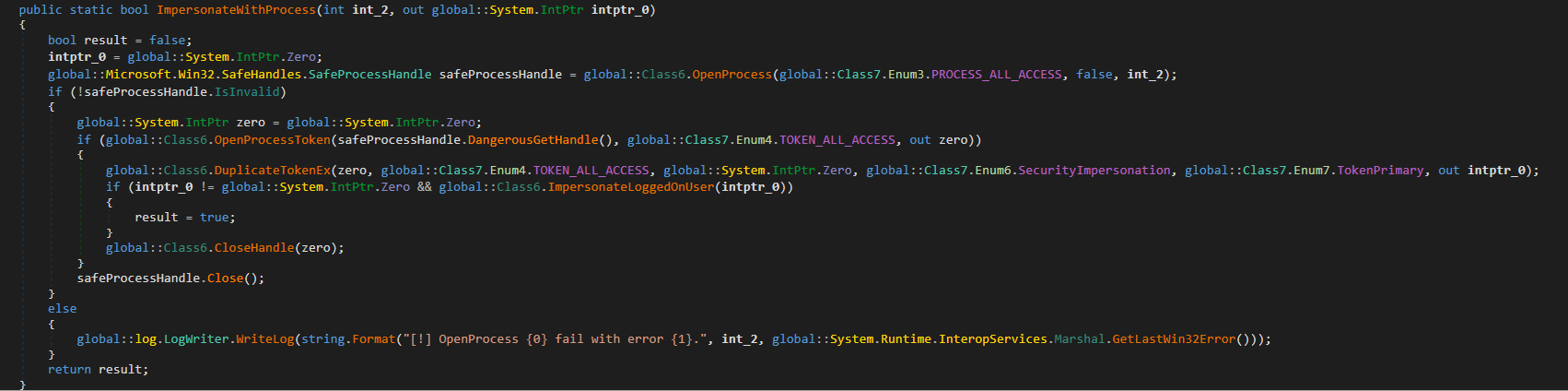
The ImpersonateWithProcess function used to retrieve user context
By default, Umbrij duplicates the token of the first explorer.exe process it encounters. If multiple users are logged in to the system, the -user <username> switch can be used to specify the name of the target user whose token to duplicate. If the -runas-currentuser switch is specified, the tool will execute within the context of the current user without duplicating any tokens.
Next, Umbrij constructs the path to the browser application folder within the user’s local application data repository. To do this, it uses the Environment.SpecialFolder.LocalApplicationData command to retrieve the repository directory from the environment variable and appends the directory of the target browser. The tool then searches for the Local State file in the following folders:
- %LOCALAPPDATA%GoogleChromeUser DataLocal State
- %LOCALAPPDATA%MicrosoftEdgeUser DataLocal State
See below for an example of the Local State file structure.
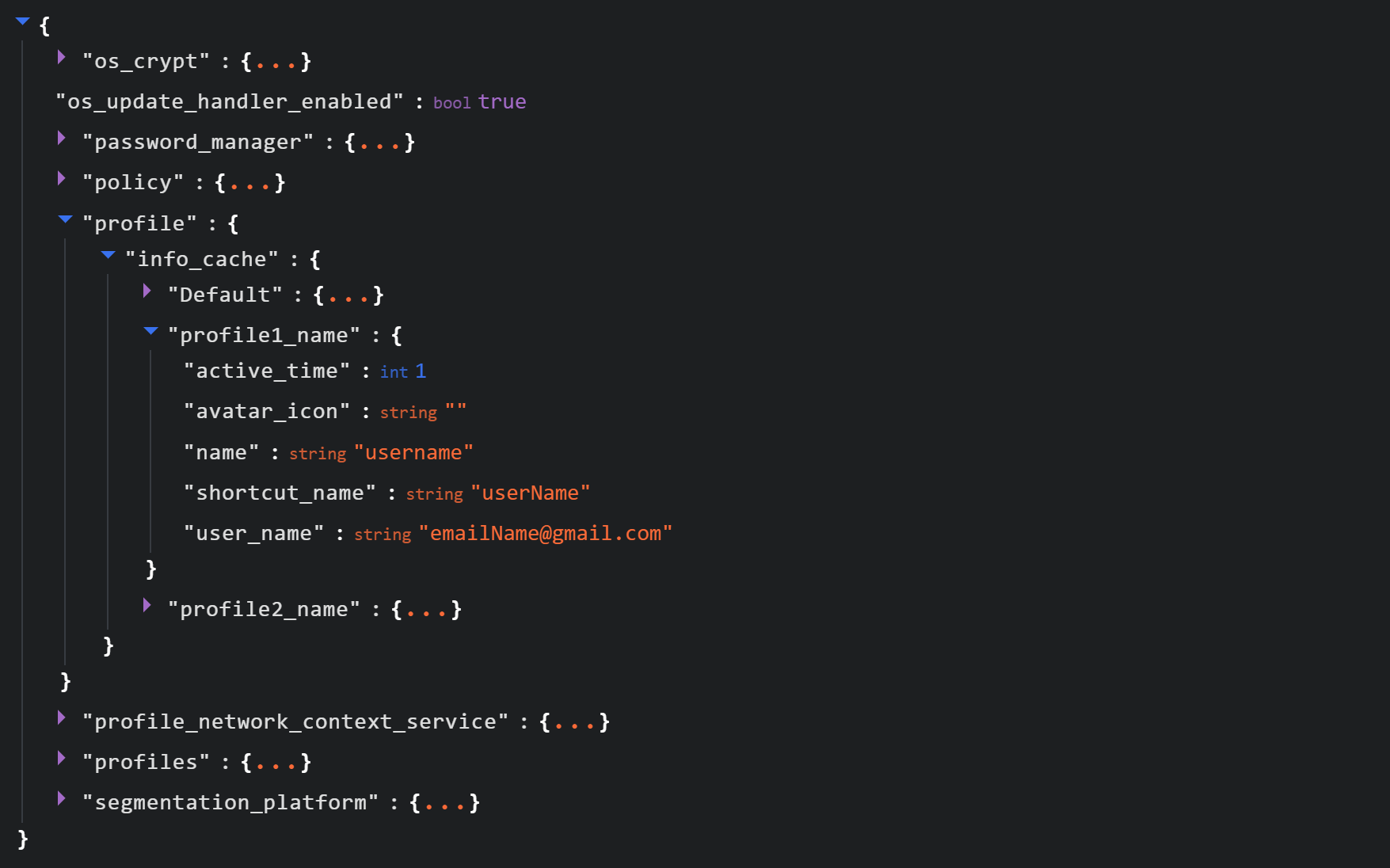
Structure of the Local State JSON file
Within this file, the tool searches for the info_cache array, which stores information about browser user profiles. Umbrij enumerates all user profiles and looks for those containing a user_name field that includes an email address. The presence of an email address indicates that the user is authenticated to a Google service. While the tool can interact with every profile it finds, if the -regex <string> parameter is passed through a command line, it searches for the specified substring within the email addresses being enumerated and proceeds exclusively with those matches.
Next, Umbrij creates the following directories for Google Chrome and Microsoft Edge, respectively:
- %LOCALAPPDATA%GoogleChromeBackupFiles
- %LOCALAPPDATA%MicrosoftEdgeBackupFiles
The tool copies the following user files and folders of each target user profile into these directories:
- IndexedDB: a folder containing a relational database used for client-side storage of structured data
- Local Storage: a component of the browser’s web storage that provides a key-value mechanism for storing data on the client side
- Network: a folder where the browser stores files related to network requests and caching, such as the network cache and session files
- Login Data: a file that stores saved passwords for various websites and applications
- Login Data For Account: a file that stores credentials associated with a Google account or other synchronized accounts within the browser
- Preferences: a file containing profile-level browser settings
- Secure Preferences: a file that stores protected configurations, such as security and synchronization data
- Web Data: a file that stores auto-fill data
If these files are locked by other processes, the tool includes a dedicated function to force-copy them.
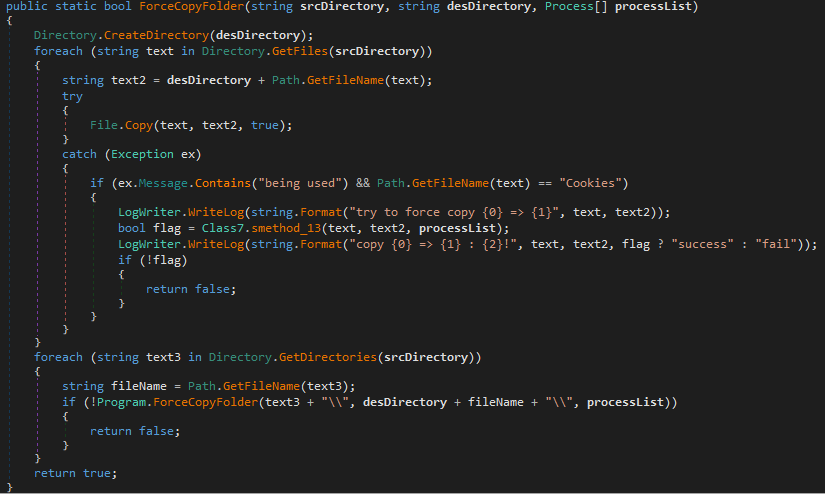
The ForceCopyFolder function used to copy files locked by other processes
As the next step, the tool searches the “Program Files” and “Program Files (x86)” directories for the browser installation folder. Once it locates the executable file and successfully copies all required files, it is ready to proceed with acquiring the authorization code.
Acquiring the authorization code
In the next phase of execution, Umbrij launches Google Chrome, Microsoft Edge, or both browsers sequentially, depending on the parameters passed in the command line. It then passes arguments to the browser based on the following template:
""{1}" --user-data-dir="{0}" --remote-debugging-port={2} --profile-directory="Default" --headless https://www.google.com/"
It populates the template with the following values:
- {0}: the path to BackupFiles, where the user profile files were copied
- {1}: the path to the browser executable file
- {2}: the remote debugging port number
The table below describes the parameters used in this browser launch template:
| Parameter | Description |
| –user-data-dir | Specifies the path to the root directory that will store the shared browser data and user profiles |
| –remote-debugging-port | Opens a port for remote browser debugging over the DevTools protocol. This switch is commonly used for automated testing with frameworks like Selenium |
| –profile-directory | Specifies the name of the specific profile folder within the user-data-dir |
| –headless | Launches the browser in headless mode, that is, without a graphical user interface |
The browser process runs in headless mode while utilizing the copied user profile. Consequently, all active user cookies are applied, which means sites with saved credentials will skip authentication prompts. Furthermore, the browser will log history to a new folder, keeping it completely hidden from the user’s primary account view.
Through this method, the threat actors gain access to the user’s authenticated sessions — specifically their Google account — along with the ability to erase any trace of their activity within the browser.

Code snippet showing Umbrij connecting to the browser via the debugging port
Next, the tool uses the Puppeteer Sharp library, a .NET version of Puppeteer, to connect to the remote debugging port. Puppeteer provides a high-level API to control Chrome or Chromium browsers over the DevTools protocol. Its primary use is for automated testing.
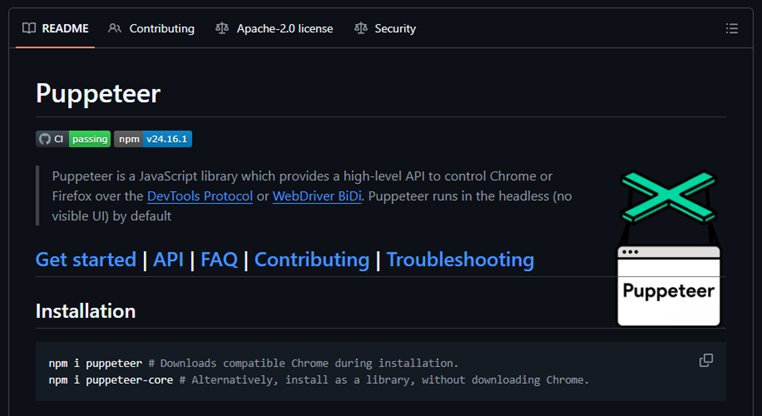
The Puppeteer module GitHub page
If the connection to the remote debugging port is successful, Umbrij sends a GET request to direct the browser to the following URL:
https[:]//accounts[.]google[.]com/o/oauth2/v2/auth/identifier?response_type=code&client_id=279448736670.apps.googleusercontent.com&redirect_uri=http%3A%2F%2Flocalhost&scope=https%3A%2F%2Fwww.googleapis.com%2Fauth%2Fcalendar%20https%3A%2F%2Fwww.googleapis.com%2Fauth%2Fcalendar.readonly%20https%3A%2F%2Fwww.google.com%2Fm8%2Ffeeds%2F%20https%3A%2F%2Fwww.google.com%2Fm8%2Ffeeds%2F%20https%3A%2F%2Fmail.google.com%2F%20https%3A%2F%2Fwww.googleapis.com%2Fauth%2Fgmail.insert%20https%3A%2F%2Fwww.googleapis.com%2Fauth%2Fgmail.labels%20https%3A%2F%2Fwww.googleapis.com%2Fauth%2Fdrive%20https%3A%2F%2Fwww.googleapis.com%2Fauth%2Fadmin.directory.user%20https%3A%2F%2Fwww.googleapis.com%2Fauth%2Ftasks%20https%3A%2F%2Fwww.googleapis.com%2Fauth%2Fadmin.directory.group.readonly%20https%3A%2F%2Fwww.googleapis.com%2Fauth%2Fapps.groups.migration%20https%3A%2F%2Fwww.googleapis.com%2Fauth%2Fuserinfo.email%20https%3A%2F%2Fwww.googleapis.com%2Fauth%2Fuserinfo.profile&flowName=GeneralOAuthFlow
The value specified in the client_id field belongs to Google Workspace Migration for Microsoft Outlook (GWMMO). This is Google’s official tool for importing email, calendar events, and contacts from Microsoft Exchange accounts or local PST files into a Google Workspace account.
Umbrij also includes the ability to switch the client_id value from 279448736670 to 1095133494869 by using the -sync parameter. This second identifier belongs to another application: Google Workspace Sync for Microsoft Outlook (GWSMO), which allows users to sync email, calendars, and other data from the cloud account directly into Microsoft Outlook.

Code snippet where the client_id replacement occurs
The remaining parameters used in the request differ from those typically utilized by the legitimate applications. See the table below for a comparison of these parameters:
| GET request parameter | URL used by Umbrij | Original URL |
| flowName=GeneralOAuthFlow | Present | Absent |
| code_challenge (PKCE) | Absent | Present (method=S256) |
| state | Absent | Present |
| login_hint | Absent | Present |
| redirect_uri | http://localhost | http://localhost:61619/callback |
As seen from the list above, Umbrij omits several parameters characteristic of the legitimate applications. For instance, Umbrij drops the code_challenge parameter, normally used for data protection when retrieving an authorization code. Additionally, the tool modifies the redirection address: while the legitimate application specifies a dedicated port and a callback path, the tool simply points to localhost.
The authorization code request specifies the set of permissions for Google services required by the application. This list also differs significantly between requests issued by the legitimate application and those generated by Umbrij. The table below details the variations in the requested scopes:
| Service parameter | URL used by Umbrij | Original URL |
| https://www.google.com/m8/feeds/ | Present (specified twice) | Absent |
| https://www.googleapis.com/auth/contacts | Absent | Present |
| https://www.googleapis.com/auth/admin.directory.resource.calendar.readonly | Absent | Present |
| https://www.googleapis.com/auth/peopleapi.readonly | Absent | Present |
After the browser navigates to the URL provided by Umbrij, the Google account selection page opens.
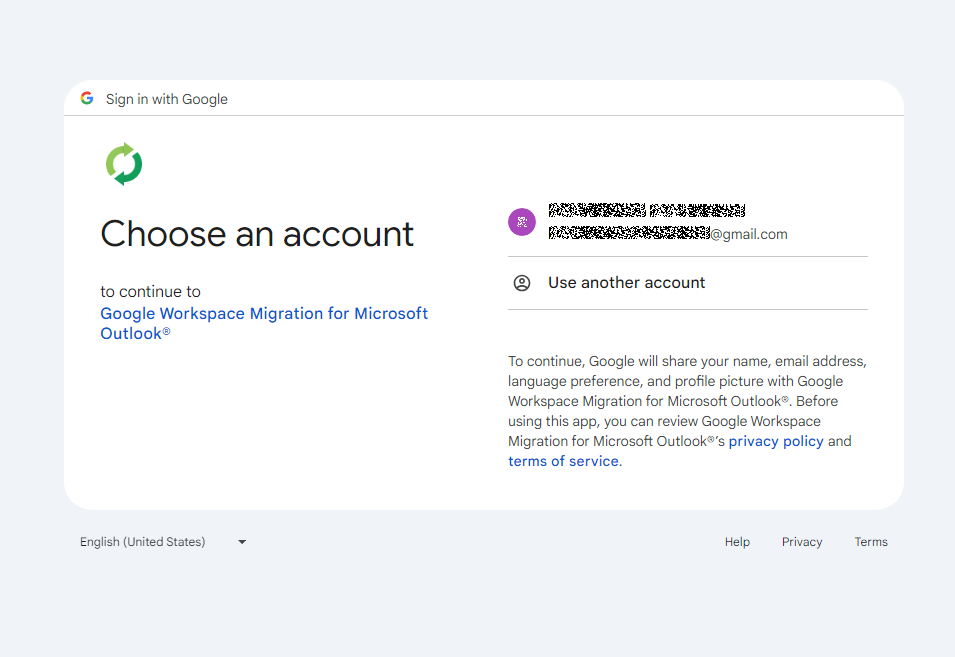
Account selection
Because the attackers copied the victim’s profile folder and are operating within their specific environment, the account selection options will include the currently signed-in user’s authenticated session. Umbrij identifies the corresponding element within the page’s HTML source code.

Searching for HTML code elements on the page
The tool uses JavaScript to emulate a mouse click on the elements, allowing it to proceed to the next step.

Simulating a mouse click on a page element
The subsequent step opens a page displaying the list of requested permissions.
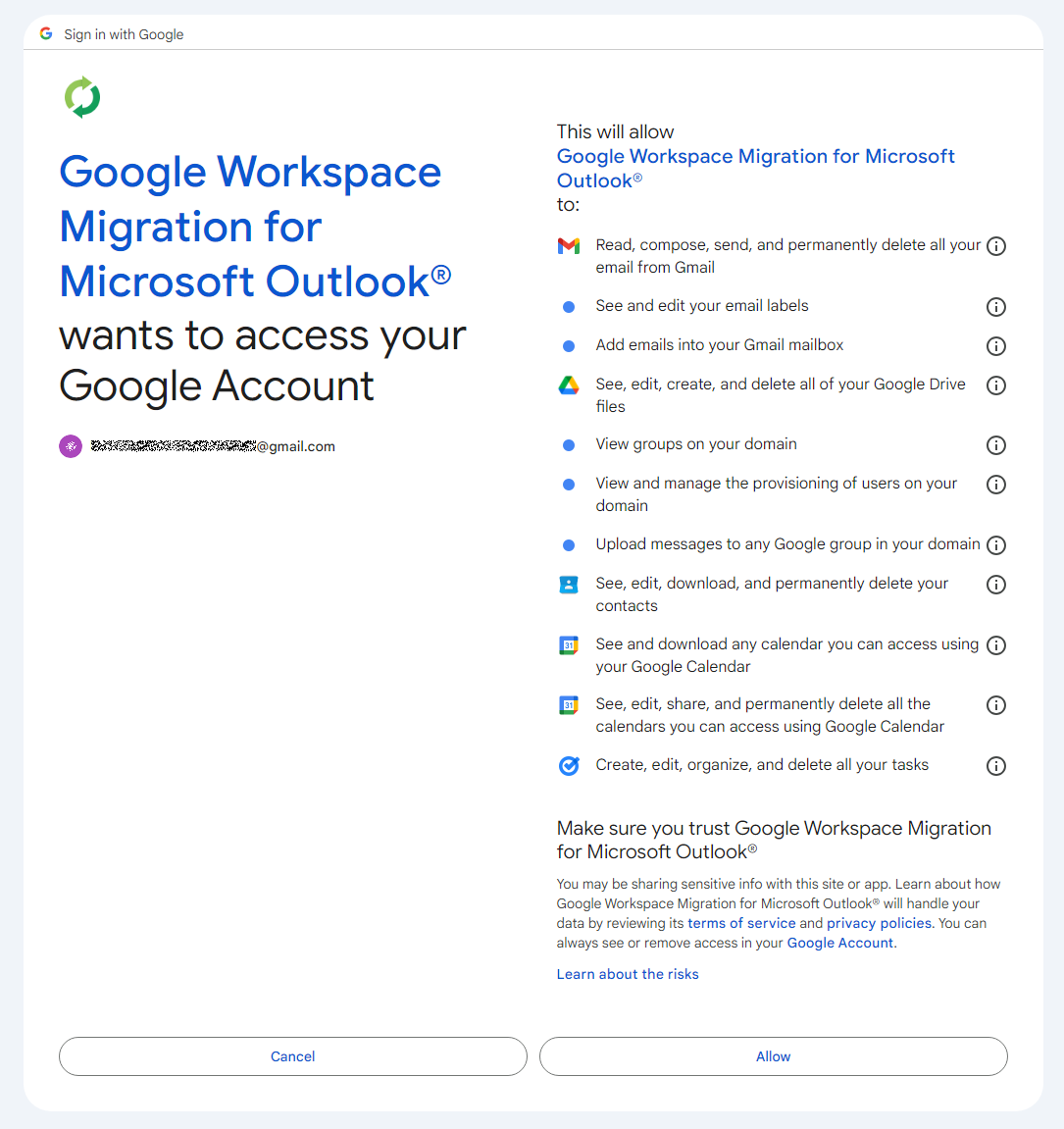
Confirming the list of requested access permissions
As shown in the screenshot, Umbrij requests full access to email, cloud storage, and contacts. Just like in the previous step, it uses JavaScript to click the “Allow” button, which completes the authentication process.
The browser is then redirected to the local address that was specified in the redirect_uri parameter of the initial request. The tool intentionally omits a port and a path to a specific page in the redirect_uri because the true objective of this action is simply to capture the code parameter from the context of the GET request. This parameter contains the OAuth authorization code. To retrieve it, Umbrij extracts the substring located between the code= and &scope parameters.
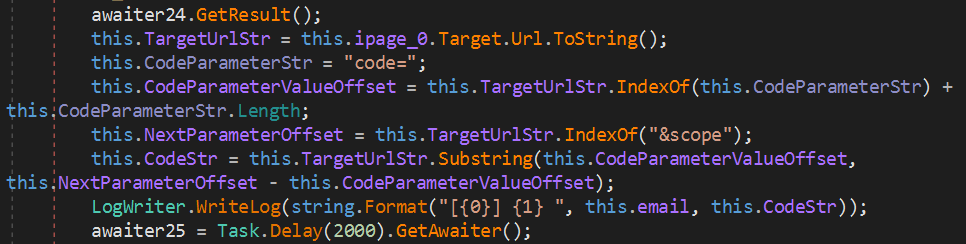
Extracting the authorization code from the GET request
Results
Umbrij, like most other tools in ToddyCat’s arsenal, logs its actions in detail and saves them to a file. It also saves the retrieved authorization code to this log file, which the operator subsequently exfiltrates from the compromised host.
Below is an example of a log file generated by version a of the tool.
------------------------------
^^^^^^^^^^^^^^^^^^^^^^^^^^^^^^^
[*] switch to sync mode.
[!] port 11111 is available!
[*] Impersonate <username> success!
[*] browser switch to chrome .
Parsing C:Users<username>AppDataLocalGoogleChromeUser DataLocal State ...
[*] detected profile: Profile 4 ==> <email>@gmail.com
[*] ready auth for <email>@gmail.com.
[*] Browser Exe path C:Program FilesGoogleChromeApplicationchrome.exe.
[!] CreateProcessAsUserW...
[*] Browser created with pid 3108
[???] <email>@gmail.com
[pup] mail : <email>@gmail.com
[pup] account choice click !
[pup] Allow click !
[<email>@gmail.com] 4%2F0AcvDMrDtzQaC-TT8<hash>uMhg
[*] RevertToSelf succeed!
^^^^^^^^^^^^^^^^^^^^^^^^^^^^^^^
The log indicates that the sync mode is selected (meaning the Google Workspace Sync for Microsoft Outlook application is used) and the debugging port is set to 11111. After locating the user profile and copying its folder, Umbrij launches Google Chrome. After this, the tool emulates clicks on the appropriate buttons to confirm permissions, ultimately outputting the final result of the operation: the stolen OAuth authorization code.
Since all requests occur within a background browser instance, the tool includes a feature to generate a PDF snapshot of the web page where the permission confirmation process halted in the event of an error.

Saving a web page as a PDF file in the case of an error
Additionally, the tool can create a PDF file for the user profile in Google Chrome and Microsoft Edge by navigating to the following internal addresses:
- edge://profile-internals
- chrome://profile-internals
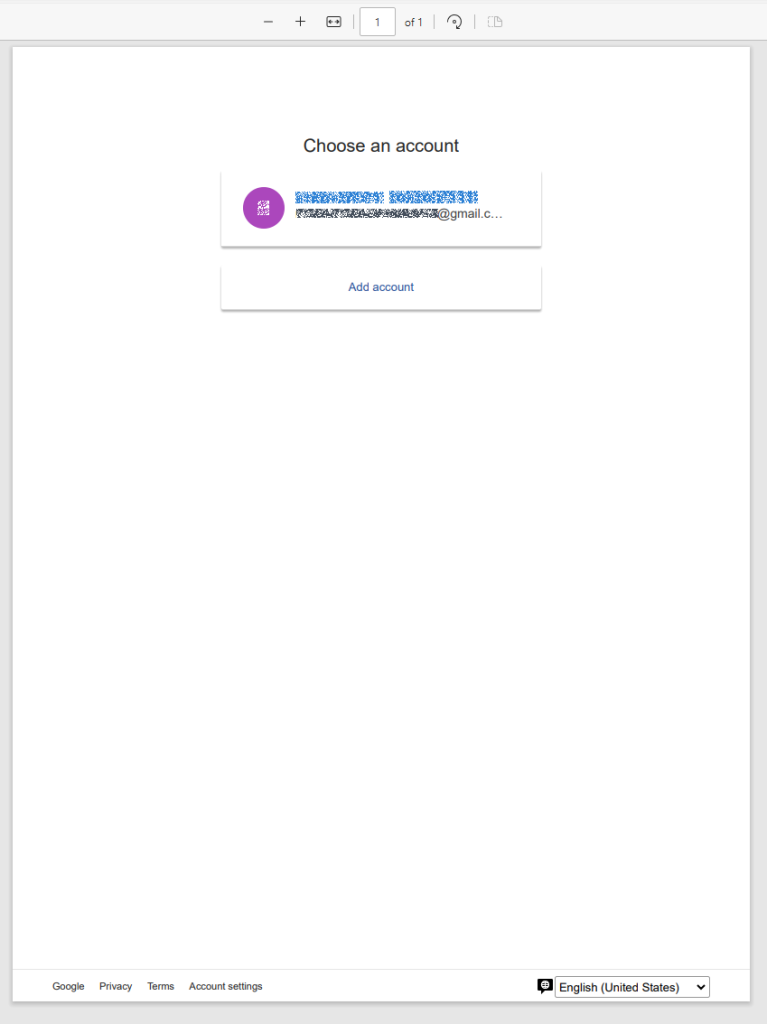
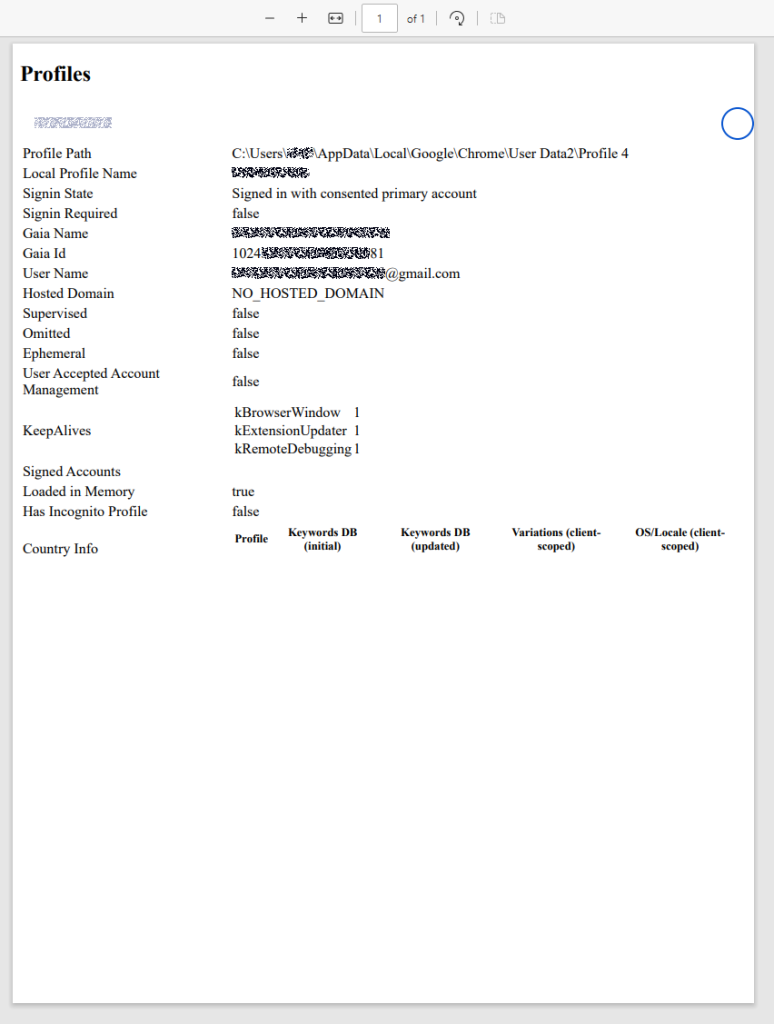
Example contents of a generated PDF file
The acquired authorization code is then exchanged for an OAuth access token. The threat actors use that token to connect to the Gmail account through the API, thus compromising corporate email communications. The diagram below illustrates the complete attack workflow.
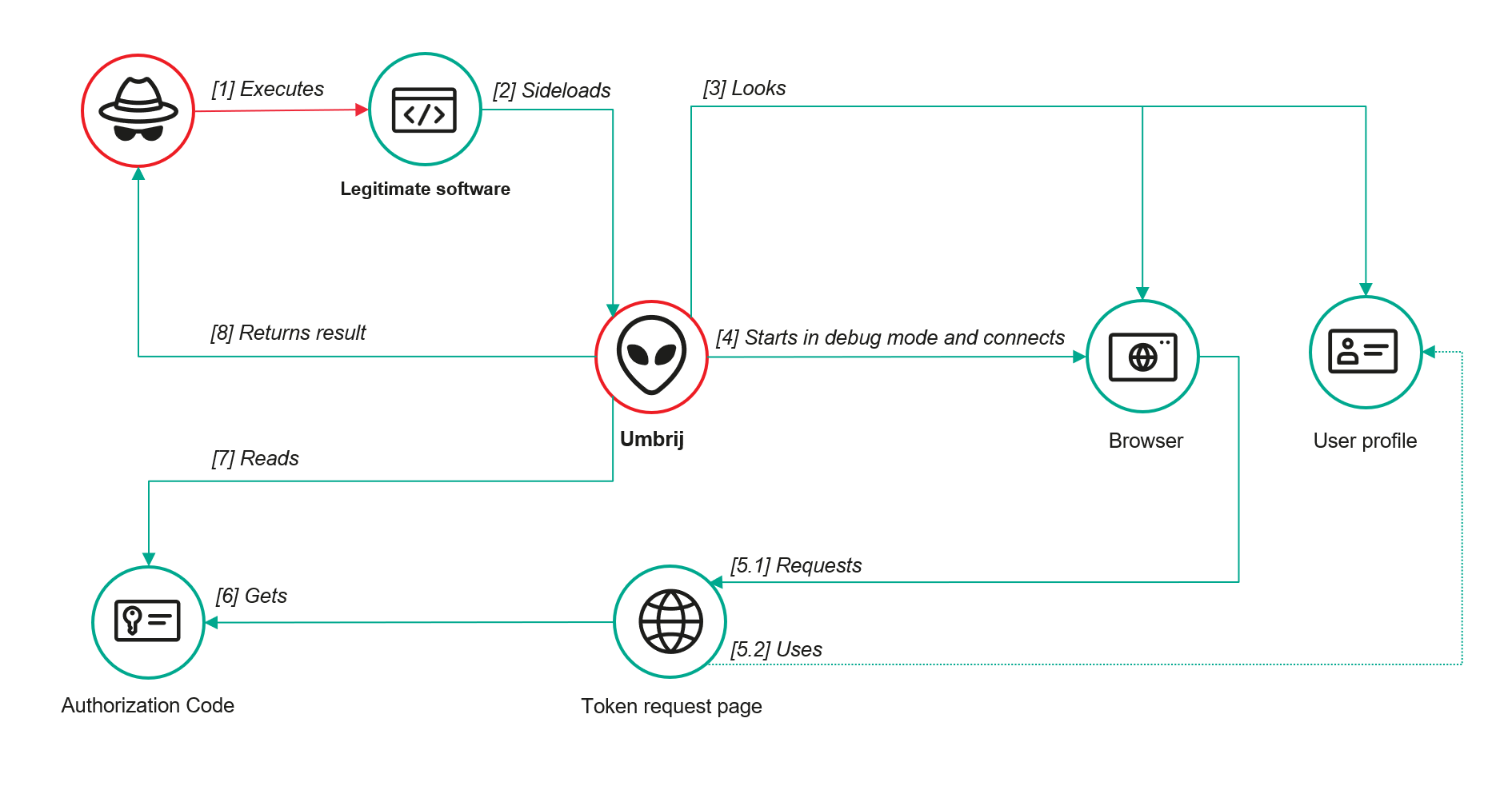
Umbrij workflow diagram
Detection
DLL sideloading
First and foremost, defenders should monitor library loading events (DLL loads) associated with the known applications vulnerable to DLL sideloading that are exploited by this tool: Bitdefender ConnectAgent, Visual Studio, and Google Desktop Search.
title: Possible Dll Hijacking Of Microsoft VisualStudio QualityTools dll
id: 246f1409-2993-46f6-9b77-e447a327df5d
status: experimental
description: Detects possible DLL hijacking of Microsoft.VisualStudio.QualityTools.VideoRecorderEngine.dll by looking for suspicious image loads, loading this DLL from unexpected locations
author: kaspersky
date: 2025-08-11
tags:
    - attack.defense-evasion
    - attack.t1574.001
logsource:
    product: windows
    category: image_load
detection:
    selection:
        ImageLoaded|endswith: 'Microsoft.VisualStudio.QualityTools.VideoRecorderEngine.dll'
    filter:
        ImageLoaded|contains: 'IDEExtensionsTestPlatformExtensions'
    condition: selection
falsepositives:  Legitimate activity
level: high
Browser launch
Launching a browser with a remote debugging port specified is a highly unusual event on standard user hosts that are not running web application development or automated testing workflows. Consequently, monitoring for these specific command-line arguments can serve as a reliable indicator of this attack.
title: Launching Chrome With Debug Parameters
id: f072803f-3cf4-4537-82e6-e8b3a201d99f
status: stable
description: Detects the execution of Chromium based browsers launched with incognito mode and remote debugging enabled
author: kaspersky
date: 2025-12-11
tags:
    - attack.lateral_movement
    - attack.defense_evasion
    - attack.t1550.001
logsource:
    category: process_creation
    product: windows

detection:
    selection:
        CommandLine|contains|all:
            - '--remote-debugging-port'
            - '--headless'
    condition: selection
falsepositives: Opening a browser as part of web application testing. Legitimate activity
level: high
Revoking third-party access
To review the authorization codes granted to applications, navigate to the Google Account settings under the Third-party apps & services section, or access the following URL directly:
https://myaccount.google.com/connections
This page displays a comprehensive list of applications and services that currently have permission to access the account.
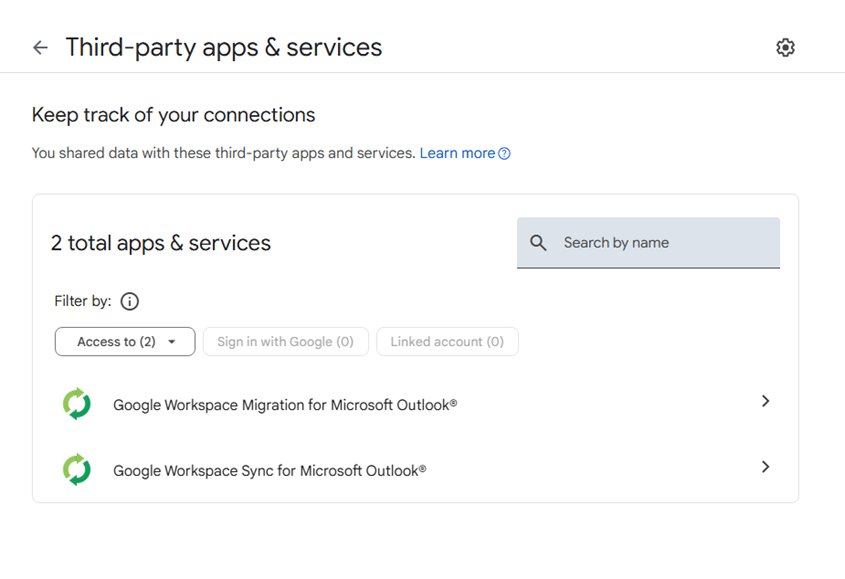
List of apps connected to the Google account
If the Google Workspace Migration for Microsoft Outlook or Google Workspace Sync for Microsoft Outlook applications appear in this list but are not actually used within your organization, revoke their access immediately. This will invalidate all potentially compromised OAuth tokens associated with them.
Risk mitigation
Launching a browser with a remote debugging port enabled is inherently suspicious for users who do not engage in web development. For these employees, you can completely disable Chromium-based browser developer tools.
This can be achieved by configuring the DeveloperToolsAvailability policy. To enforce this, set the registry value to 0x00000002 for the following Windows Registry key and restart the browser:
HKLMSoftwarePoliciesGoogleChromeDeveloperToolsAvailability
To verify that the policy has been successfully applied, navigate to the browser’s internal policies page at chrome://policy:

Note that while disabling developer tools can successfully disrupt the automated retrieval of the OAuth authorization code, it will not help, however, if the adversary decides to leverage the browser’s graphical user interface (GUI) — though this manual approach is significantly less likely due to the friction it introduces for the attackers. Therefore, as a risk mitigation measure, users should be instructed to explicitly log out of their Google accounts as soon as their sessions are complete.
Takeaways
The ToddyCat APT group continues to search for ways of compromising corporate email communications. We have been tracking the group for a long time and we have observed continuous updates to its arsenal in an attempt to bypass security defenses, even as their core techniques remain consistent. For instance, the group has long relied on DLL sideloading to stealthily drop malicious utilities and scheduled tasks. However, their new tool, Umbrij, automates the attackers’ attempts to gain access to organizational email accounts. This automation not only helps increase the scale and frequency of their attacks but also demonstrates ToddyCat’s strong motivation and advanced technical skills.
To defend against these threats, corporate security teams must monitor for suspicious library loading events initiated by legitimate files, watch for instances of browsers launching in developer mode, and conduct regular audits of third-party applications and services with access permissions to Google accounts. Furthermore, deploying a robust, comprehensive security solution — such as Kaspersky Next — is critical to detect this type of malicious host-based activity in a timely manner.
Indicators of compromise
Additional information about this threat is available to customers of the Kaspersky Threat Intelligence Reporting service. Contact: intelreports@kaspersky.com.
Malicious files
1AB58838E5790EFB22F2D35AB98C0B7D Umbrij ver. a
A7D7D6C4C3F227F7117261C63B9E23A9 Umbrij ver. a
3D3A621F852C42D97FD7260681E42508 Umbrij ver. a
3432DD9AC0DF80EF86EB80BD080F839B Umbrij ver. a
22AAEB4946BA6D2F2E27FEB7DBB295DE Umbrij ver. b
F61FBFB7AA1CD5DC8F70B055B51563E2 Umbrij ver. b
F169D6D172DFB775895A5E2B1540C854 Umbrij ver. c
Legitimate files leveraged for DLL sideloading
| MD5 | File name | Name of DLL being loaded |
| 9F5F2F0FB0A7F5AA9F16B9A7B6DAD89F | GoogleDesktop.exe | GoogleServices.DLL |
| 28CB7B261F4EB97E8A4B3B0D32F8DEF1 | BDSubWiz.exe | log.dll |
| BAE82A15D1DBFB024617B9B56A8E5F66 | VSTestVideoRecorder.exe | Microsoft.VisualStudio.QualityTools.VideoRecorderEngine.dll |
Paths to DLL sideloading files
| Path to the file that loads the DLL | Path to the DLL being loaded |
| C:Users<user>AppDataLocalTempBDS.exe | C:Users<user>AppDataLocalTemplog.dll |
| C:UsersPublicBDS.exe | C:UsersPubliclog.dll |
| c:userspublicbdsubwiz.exe | C:UsersPubliclog.dll |
| C:WindowsTempBDS.exe | C:WindowsTemplog.dll |
| c:windowsvssbds.exe | C:WindowsVsslog.dll |
| c:windowstempGoogleDesktop.exe | c:windowstempGoogleServices.DLL |
| c:windowstempVSTestVideoRecorder.exe | c:windowstempMicrosoft.VisualStudio.QualityTools.VideoRecorderEngine.dll |